Does the battery on your smartphone, tablet, or laptop not
last very long? If the device is older than a year, short battery life could be
the sign of an ageing battery. You can either opt to get the battery replaced
or follow certain tips to maximise the battery life. However, there's no reason
for you to start doing this only when you experience trouble - for best
results, implement these practices from day one.
Battery life is a tricky subject and everyone has different
advice so we checked various battery guides from experts who have performed
extensive tests to back their claims. We also looked at the advice the
manufacturers have to offer. Here's what you need to know to prolong the health
of your device's battery.
The basics
Before you follow the guide, it's important to know a few
facts. Our smartphones, tablets and laptops use lithium-ion batteries. These
batteries will lose capacity over time. You can delay this process by taking
the measures listed below but you can't stop it entirely. Batteries are
designed to retain up to 80 percent of their capacity for a limited number of
charge cycles. This number will be slightly higher for bigger, more expensive
batteries, typically found in tablets or laptops. For instance, Apple claims
that the iPhone can hold 80 percent of its capacity for 500 charge cycles,
while the number is 1,000 for iPad and MacBook models. The exact number will
vary across devices but this is a fair benchmark.
We hear you ask, "What's a charge cycle?" The
battery completes one charge cycle when you charge it to 100 percent and drain
it to 0. If you charge it to 50 percent and then drain it completely, you only
complete half a charge cycle. The reality is a little more complicated than
that, but it's a good general rule of thumb. That means that you can't avoid
charge cycles by bringing your phone back to 100 percent whenever it hits 90 -
ten such charges will count as a charge cycle.
Prolonging battery life
You can't change the laws of physics, but you can reduce the
damage it receives on a day to day basis in the course of regular use. You just
need to be aware of a few simple things like the temperature and the level of
charge on your phone. Here's a checklist you should keep in mind, to keep your
batteries healthy for as long as possible.
1. Mind the temperature
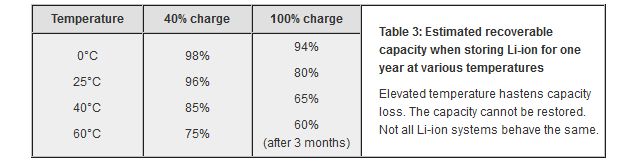
The temperature has a big impact on your device's battery.
If you live in places where the temperature is above 35 degrees Celsius or
below 0 degrees Celsius, battery capacity is going to reduce faster. Try and
keep the phone or tablet out of direct sunlight, or exposing it to below
freezing temperatures, when possible. Extreme heat affects battery capacity a
lot more than extreme cold, but both are harmful. Battery University has an
excellent guide on prolonging battery health, with a table (see below) to
illustrate the effect of temperatures on battery capacity.
2. Partial discharge vs. Full discharge
While you may have heard about letting your device getting
fully discharged before plugging in the charger, generally speaking partial
discharge cycles are better than full discharge cycles. Not all lithium-ion
batteries show these symptoms, but keeping the charge in the 40 to 80 percent
range is generally helpful. That means charge your phone when it reaches 40
percent charge, and stop charging it when the battery reaches 80 percent,
though you'll need to balance this - and all other advice - with practical
usage. So when you are heading out and won't be near a charger for a while, of
course charge your device to 100 percent, instead of obsessing about numbers.
3. Don't leave it plugged in all the time
Leaving your devices plugged in at 100 percent is also
harmful for battery life. Battery University says overcharging is not good for
the battery: "Avoiding full charge has benefits, and some manufacturers
set the charge threshold lower on purpose to prolong battery life... Li-ion
cannot absorb overcharge, and when fully charged the charge current must be cut
off. A continuous trickle charge would cause plating of metallic lithium, and
this could compromise safety."
While this advice may be easier to follow with smartphones,
and especially tablets, it may not always be practical for laptops. If you are
someone you leaves the laptop plugged in all the time, it's going to harm your
battery in the long term. It's better to make sure that you're discharging it
down to 40 percent every once in a while. On the other hand, discharging the
laptop as soon as the battery hits 100 percent will use up your charge cycles
sooner, which is not ideal in the long run. The best option is to be practical.
Discharge it occasionally, but don't do it so religiously that your laptop is
low on power when you are, say, stepping out for a meeting and might need that
extra bit of juice.
4. Avoid using ultra-fast chargers
Some devices can be charged faster using certain ultra-fast
chargers, but that's not good for your device's health in the long term.
Battery University gives sound advice on this topic: "An analogy can be
made with an underpowered engine pulling a large vehicle; the stress is too
large and the engine will not last."
5. Do not use knock-off chargers
You can get a knockoff charger on the road for Rs. 50, and
use it to charge a phone you paid more than Rs. 50,000 for, but we'd advise
against it unless you're willing to risk damaging your battery or, worse,
actual injury. Apple even had a third party charger trade-in programme to
ensure that customers use original chargers.
5. Medium- to long-term storage
If you're not using your device for a while, then you should
try to keep the battery at around 50 percent before turning it off. If you're
going for a long trip and want to leave your phone in storage, most
manufacturers recommend that you should keep it in a cool place (the
recommended temperature is under 32 degrees Celsius) and ideally, keep the
battery at the halfway mark.
Apple's battery guide mentions that if you plan to store the
device for longer than six months, you should charge it to 50 percent every six
months. This is something you should do regardless of the brand of the device
you are using.
Unfortunately, there's no avoiding the fact that batteries
have a finite life, after which they will certainly degrade. Following these
basic tips can help delay the inevitable.


0 comments:
Post a Comment